It's important to understand the process that takes place (in a few seconds) when you request a webpage, by typing the URL into your address box, or by clicking a link etc.
Please refer to the diagram below and read the information listed below the diagram...
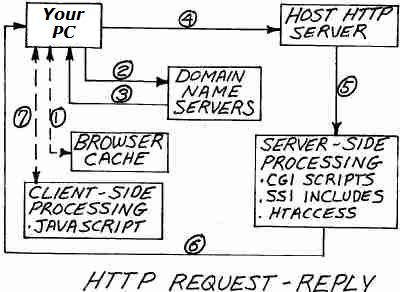
- A Webpage Request is made by the Client's User Agent (Browser)... by typing the URL (Webpage Address) into the Browser's address box, or by clicking a link, etc. First the User Agent (Browser) checks to see if the Webpage URL is stored in it's Cache (Temporary Files Directory)... if it is there, the Browser loads the Webpage for viewing...
- If the URL is not Cached, the Webpage Request is passed to a local Domain Name Server, which finds the Web Host Server where the URL is located on the WWW (thru several steps)
- The local DNS passes that Host Server location back to the Client
- The Client accesses the Host Server... If that Host Server is "Up and Running" it accepts the Request and finds the URL file, if the Server is "down" the Browser renders an Error Message, or if the Webpage cannot be found on the Server, or if any other errors are found, the Server sends an Error message back to the Client's Browser...
- The Webpage Source Code is interpreted by the Host Server, and any Server-Side Scripting is processed, including Redirects, SSI Includes etc.
- The final Server Reply is passed back to the Client's Browser
- The Browser interprets the Webpage Source Code and any Client-Side Scripting is processed (like JavaScript)... and the final Webpage is rendered in the Client's Browser and is added to the Browser's Cache (unless Caching is disabled)...
NOTE: This entire process is repeated for every element on the webpage that has it's own URL... Images, Remote Stylesheets, Remote Javascripts etc. ...however a certain "keep-alive" time period is created which eliminates several of these steps for repeated Requests...